The Best Voice-to-Text Tools for Windows in 2026: A Neutral Comparison
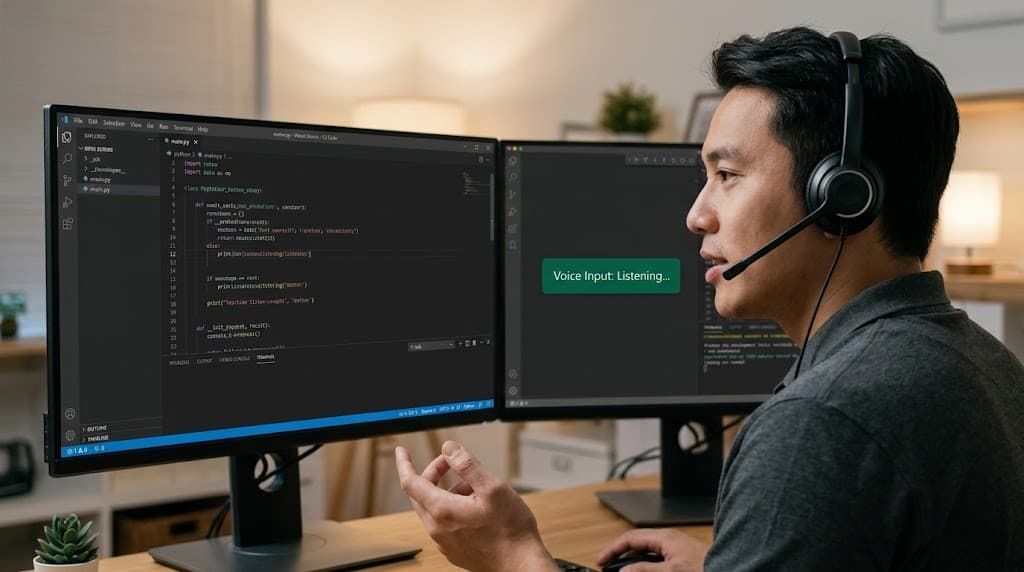
You're typing in VS Code when a thought hits. By the time you refocus on the screen, the idea is half-gone.
Voice-to-text should help here. But there's no single "best" tool. The right choice depends entirely on what matters most to you: speed, accuracy, privacy, cost, or ecosystem fit.
Some tools prioritize instant local processing (sub-1-second latency). Others sacrifice speed for cloud-based AI refinement and higher accuracy. Some cost $5 one-time; others cost $700 or $144/year recurring. Some work everywhere; others specialize in specific apps or industries.
This guide compares the top voice-to-text options for Windows without positioning any as universally superior. By the end, you'll know which tool fits your actual workflow and priorities.
TL;DR — Choose Based on Your Needs
If speed matters most: Grompy (<800ms), DictaFlow, or open-source alternatives (VoiceInk, OpenWhispr)
If accuracy matters most: Dragon NaturallySpeaking (99%), Wispr Flow with AI polish (98%+)
If privacy is non-negotiable: Grompy, SuperWhisper, VoiceInk, open-source tools (truly offline, no external processing)
If you want free: Windows Voice Typing (cloud-based, limited), or open-source (offline, requires technical setup)
If you're in a specialized field: Dragon NaturallySpeaking (medical, legal terminology), or industry-specific versions
If you need cross-platform sync: Wispr Flow, Voicy (both cloud-dependent, both require subscriptions)
If you're budget-conscious: Grompy ($5 one-time), Windows Voice Typing (free), open-source (free but technical)
Understanding the Core Tradeoffs
Voice-to-text involves real tradeoffs. No tool excels at everything. Here are the actual decision factors.
Speed vs. Accuracy
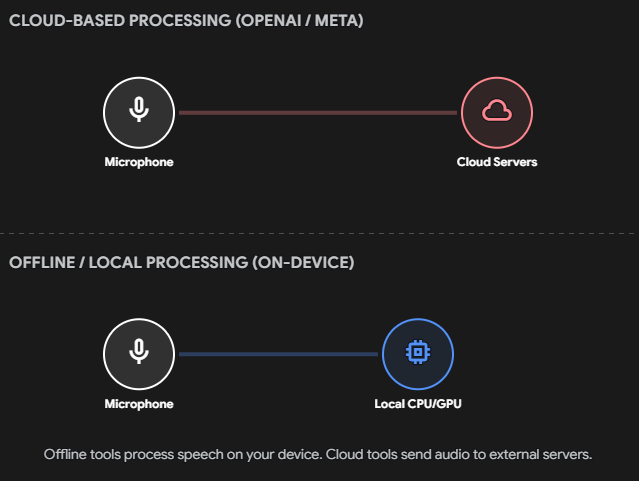
Offline tools process speech locally on your Windows PC. Latency is fast (<1 second typically) because nothing travels over the network. The tradeoff: the model is smaller and lighter, so accuracy may be 95-97% instead of 98%+.
Cloud tools send audio to remote servers where larger, more powerful models process it. You get higher accuracy (98%+) but introduce network latency (1-10+ seconds depending on bandwidth and server load).
The choice depends on your actual workflow:
Real-time dictation while coding? Offline wins. You notice lag immediately when you're typing fast.
Transcribing a 1-hour meeting after the fact? Cloud wins. Speed doesn't matter; accuracy is the only factor that counts.
Writing long-form content that needs AI polish (grammar, tone)? Cloud tools with AI editing (Wispr Flow) may justify the latency.
Privacy: Real Concerns vs. Marketing
Offline guarantees matter when:
You work in healthcare (HIPAA patient data cannot leave your network)
You're a lawyer (attorney-client privilege; external processing may breach privilege)
You handle classified government or security work
You're working on proprietary algorithms or confidential business strategy
Your jurisdiction has strict data residency laws (GDPR, CCPA, etc.)
Privacy concerns that are real but less critical:
Your voice travels to OpenAI or Google (true for cloud tools), but these companies have terms of service saying they don't train on voice data or retain it long-term
Cloud processing means someone could theoretically access your data, but you're relying on security practices (SOC 2 compliance, encryption in transit) rather than ironclad guarantees
Where privacy is less of a concern:
You're dictating casual emails or Slack messages (not sensitive)
The vendor has strong compliance certifications (Wispr Flow has SOC 2 Type II)
You're already comfortable with cloud processing from other tools you use (Gmail, Google Docs, Microsoft Office 365 all process data externally)
Honest assessment: If you don't work in regulated industries, offline processing may not be your main concern. The question is whether voice-to-text introduces additional risk you're not comfortable with, not whether all cloud processing is universally bad.
Cost: One-Time vs. Recurring
One-time purchases: Grompy ($5), Dragon Professional ($700)
Annual subscriptions: Wispr Flow ($144/year), Voicy ($82/year), Dragon Anywhere ($180/year)
5-year total cost:
Grompy: $5
Voicy: $410
Wispr Flow: $720
Dragon Anywhere: $900+
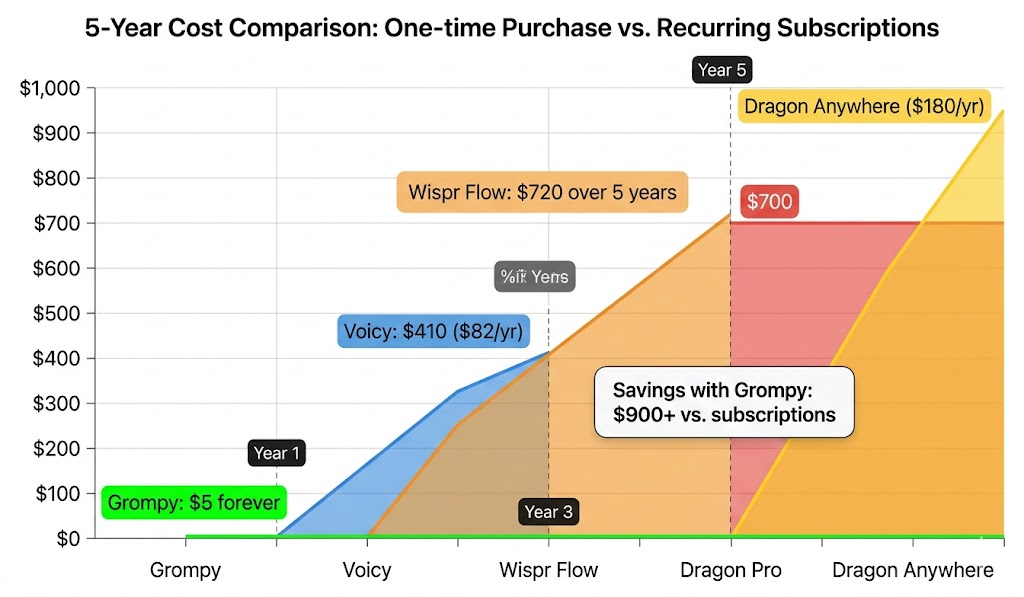
Is the subscription worth it? Only if you actually use the features you're paying for. Wispr Flow's AI editing (grammar correction, filler word removal, tone adjustment) genuinely saves time for writers and professionals composing across different contexts. If that's your workflow, $144/year is reasonable. If you just need basic dictation, paying $82-144/year doesn't make sense.
Hidden cost of subscriptions: Vendor lock-in. Once you've trained Wispr Flow on your vocabulary and writing style, switching tools is friction. Vendors know this and can afford to raise prices. One-time purchases avoid this dynamic but come with the trade-off of needing to commit upfront to one tool.
What to Look For
Before comparing specific tools, clarify what matters:
Accuracy: Modern tools achieve 95%+ accuracy with a decent microphone in a quiet room. OpenAI's Whisper (released Sept 2022) trained on 680,000 hours of audio and achieved 3.96% word error rate in English. GPT-4o Transcribe pushes to 2.46%. Anything above 95% is production-ready; the difference between 96% and 98% matters less than whether the tool fits your workflow.
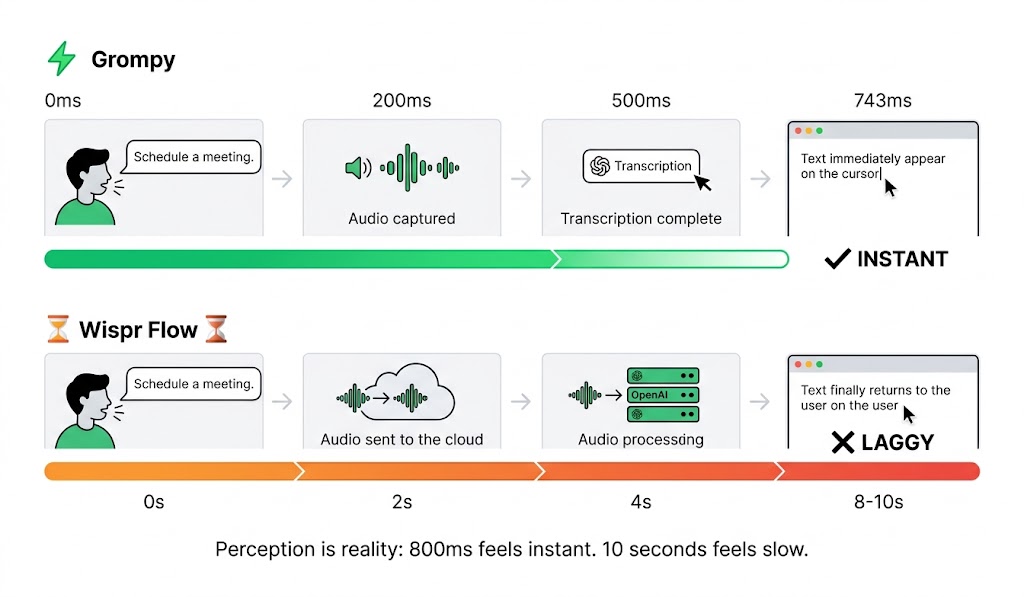
Latency: 800ms feels instant. 1-2 seconds is acceptable. 3+ seconds is noticeable lag. 8-10 seconds is unsuitable for real-time dictation (fine for post-hoc transcription).
Universal compatibility: Does it work in VS Code, Slack, your browser, terminal, email? Or only in specific apps? OS-level text injection is better than clipboard paste; tools that only work in certain apps create friction.
Subscription model: One-time, free, or recurring? Recurring fees add up and create vendor lock-in.
Language support: 18+ languages if you work with international teams. Auto-detection is a bonus.
Learning/customization: Can it learn your voice and vocabulary, or is it one-size-fits-all?
Tool-by-Tool Comparison: When Each Is the Right Choice
Grompy
What it is: Lightweight, offline voice-to-text for Windows. Press hotkey (default Ctrl+Shift+Space), speak naturally, text appears in any app.
Speed: <800ms (demo shows 743ms)
Offline: Yes, 100% local processing
Price: $5 one-time
Works in: Any app (OS-level text injection)
When it's the right choice:
You want fastest response for real-time dictation
You need offline processing (healthcare, legal, security work)
You're budget-conscious and don't need AI editing
You dictate daily and want to avoid recurring payments
You use it in VS Code, terminal, or apps that don't work with other tools
Honest limitations:
Smaller user base than Dragon or Wispr Flow (less community support)
Younger product (2026 launch) means less battle-tested
Accuracy is 95%+ (solid, but not best-in-class like Dragon's 99%)
No cross-device sync (vocabulary stays on Windows if you use Mac)
No AI editing (grammar, tone adjustment are manual)
Requires network monitoring to verify privacy claims independently
The real question: Is <800ms response time worth switching tools for your workflow? If you code, draft quickly, or work in bursts, yes. If you dictate occasionally, probably not.
Windows Voice Typing (Win+H)
What it is: Built into Windows 10 and 11. Press Windows key + H to activate.
Speed: 1-3 seconds (varies by PC and internet speed)
Offline: No, cloud-based (Microsoft servers)
Price: Free
Works in: Most text fields (inconsistent support)
When it's the right choice:
You want to test whether voice-to-text fits your workflow (zero cost, zero commitment)
You dictate occasionally (quick notes, short emails, not sensitive)
You're already comfortable with Microsoft's data handling (Office 365, Outlook, etc.)
Honest limitations:
Requires internet connection
App support is inconsistent (works in Word, limited in some other apps)
Latency is noticeable (1-3 seconds for cloud roundtrip)
Accuracy 90-92% (decent but below purpose-built tools)
No custom vocabulary or learning
Cannot work offline
The real question: Is free testing worth it? Yes, if you've never tried dictation. Is it a long-term solution? Probably not, if you dictate regularly.
Wispr Flow
What it is: Premium, cross-platform dictation tool with AI editing and team features. Available Mac, Windows, iOS.
Speed: 1-2 seconds normal; 8-10 second cold start
Offline: No, cloud-based (OpenAI, Meta servers)
Price: $144/year
Works in: Anywhere (OS-level hotkey activation)
When it's the right choice:
You're already using AI tools daily (ChatGPT, Claude, Cursor)
You write extensively and want AI editing (grammar, filler words, tone adaptation)
You work across Mac and Windows and need vocabulary synced
You value polish and ease-of-use over cost
You compose in multiple contexts (emails, Slack, documents) and want tone-aware adaptation
Honest limitations:
8-10 second cold start is real; you notice it every session
All voice data goes to external servers (unsuitable for healthcare, legal, classified work)
$144/year recurring cost
Vendor lock-in (once trained, switching is friction)
Price could increase (no long-term cost guarantee)
For basic dictation without AI editing, it's overkill and expensive
The real question: Are you actually using the AI editing features enough to justify $144/year? If yes, it's worth it. If you just need basic dictation, cheaper tools exist.
Dragon NaturallySpeaking
What it is: The industry standard for dictation in specialized fields. Available as Desktop (offline) or Anywhere (cloud).
Speed: 1-2 seconds (after voice training)
Offline: Yes (Desktop version runs locally)
Price: $700 one-time (Professional Desktop), or $55+/month (Anywhere cloud)
Works in: Windows with deep integration; specialized versions for medical, legal
When it's the right choice:
You're a doctor, lawyer, or work in specialized fields needing industry vocabulary
You dictate 30+ minutes daily and 99% accuracy is worth the cost
You're willing to invest time training the tool on your voice
You want deeply integrated voice commands and macros for automation
You work in regulated industries (medical, legal) requiring offline processing
Honest limitations:
High cost ($700 or $55+/month)
Steep learning curve for advanced features
Older user interface (less modern than Wispr Flow)
Most users don't need 99% accuracy (95% is fine for most work)
Overkill for occasional dictation
Desktop version is Windows-only (no Mac native version)
The real question: Do you dictate enough daily to justify $700 or $55+/month? If you're a doctor or lawyer, probably yes. If you dictate occasionally, definitely no.
Voicy
What it is: Cross-platform dictation app for Mac, Windows, and browsers.
Speed: 1-2 seconds
Offline: No, cloud-based
Price: $82/year
Works in: Mac, Windows, Chrome extension, anywhere via hotkey
When it's the right choice:
You use both Mac and Windows and want one tool everywhere
You want cross-platform sync cheaper than Wispr Flow
You like polished UI and active customer support
Honest limitations:
Cloud-dependent (same privacy model as Wispr Flow)
Slower than offline tools
Only $62/year cheaper than Wispr Flow ($144/year) but with fewer AI editing features
Smaller innovation pace than Wispr Flow
If you only use Windows, cheaper offline options exist
The real question: Is cross-platform worth the $82/year vs Grompy's $5 offline? Only if you actually use both platforms regularly.
DictaFlow
What it is: Windows-native tool with hybrid model: local Whisper processing with optional cloud "AI refinement."
Speed: <1 second locally
Offline: Yes (can run 100% local)
Price: Free (basic)
Works in: Windows, OS-level injection
When it's the right choice:
You want control over privacy/power tradeoff (local by default, cloud optional)
You use an older Windows machine (lightweight, low resource usage)
You're technical and comfortable with open-source tools
You want to optionally use cloud AI without requiring it
Honest limitations:
Smaller ecosystem than commercial tools
Less polished than Wispr Flow or Dragon
Requires technical comfort to configure
Limited cross-device sync
The real question: Do you want full control over privacy/accuracy tradeoff? If yes, it's powerful. If you want simplicity, commercial tools are easier.
Open-Source Alternatives (VoiceInk, Handy, OpenWhispr)
What they are: Free, community-maintained, fully offline speech-to-text tools.
Speed: <1 second
Offline: Yes, 100% local
Price: Free
Works in: Varies; most require command-line setup
When it's the right choice:
You're a developer comfortable with GitHub and command line
Privacy is absolute priority (code is auditable)
Zero cost is essential
You value transparency and open-source principles
Honest limitations:
Steep setup curve (downloading models, configuring hotkeys, troubleshooting)
No customer support (community-driven)
Manual updates (not automatic)
Smaller user base (fewer solved issues online)
Accuracy depends on which model you choose (92-98%)
The real question: Are you willing to spend 1-2 hours setting up to save $5 and gain absolute privacy certainty? If yes, it's worth it. If you value ease-of-use, skip it.
Google Docs Voice Typing
What it is: Built into Google Docs (Tools > Voice typing).
Speed: 1-2 seconds
Offline: No, cloud-based
Price: Free
Works in: Google Docs only
When it's the right choice:
Your entire workflow is Google Docs
You want free and need zero setup
You're a student or casual writer
Honest limitations:
Locked to one app (not useful for email, Slack, code, etc.)
You must speak punctuation ("period," "comma")
Cloud-dependent
Limited accuracy and no learning
If you use any other writing tools, it's too limited
The real question: Is your workflow 100% Google Docs? If not, this tool won't help you.
Otter.ai
What it is: Meeting transcription and note-taking tool.
Speed: Real-time transcription during calls
Offline: No, cloud-based
Price: Free tier (600 min/month) or $8.33/month
Works in: Zoom, Teams, Google Meet (meeting-focused)
When it's the right choice:
You need to capture and transcribe meetings
You want speaker identification and searchable transcripts
You collaborate with teams on meeting notes
Honest limitations:
Not designed for real-time dictation into text editors
Meeting-focused (doesn't help you dictate emails or code)
Cloud-dependent
The real question: Do you need meeting transcription or real-time dictation? These are different problems. Otter solves meetings, not cursor injection.
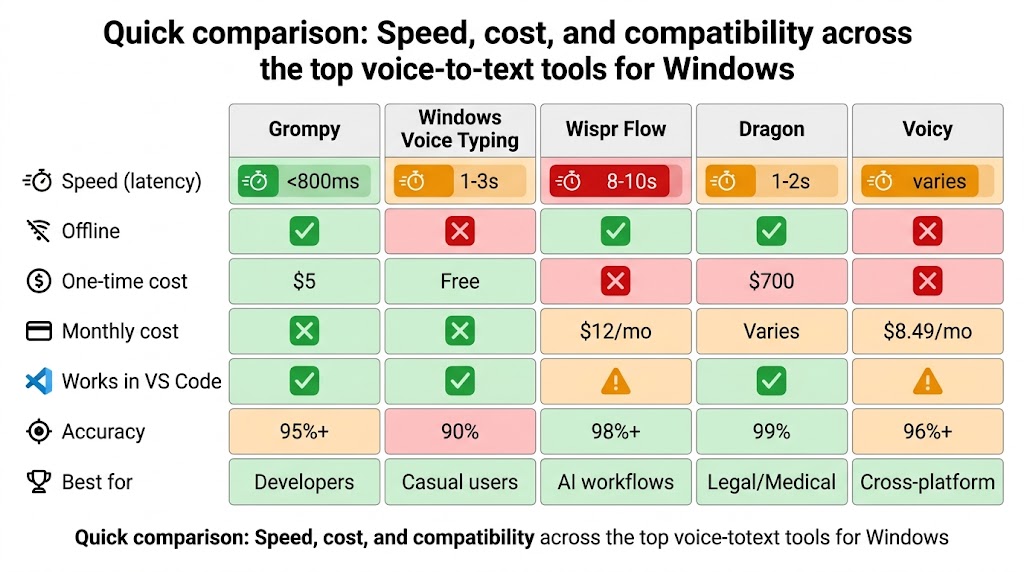
Quick Comparison Table
Tool | Speed | Offline | One-Time Cost | Yearly Cost | Works Everywhere | Best Use Case |
|---|---|---|---|---|---|---|
Grompy | <800ms | ✅ | $5 | $0 | ✅ | Speed + privacy + budget |
Windows Voice Typing | 1-3s | ❌ | Free | $0 | ⚠️ | Testing the concept |
Wispr Flow | 1-2s* | ❌ | ❌ | $144 | ✅ | AI editing + cross-platform |
Dragon | 1-2s | ✅** | $700 | ~$0** | ✅ | Medical, legal, specialized |
Voicy | 1-2s | ❌ | ❌ | $82 | ✅ | Mac + Windows users |
DictaFlow | <1s | ✅ | Free | Varies | ✅ | Privacy control + technical |
Open-source | <1s | ✅ | Free | $0 | ✅ | Max privacy + dev comfort |
Google Docs | 1-2s | ❌ | Free | $0 | ❌ | Google Docs only |
Real-time | ❌ | ❌ | $100 | ❌ | Meeting transcription |
8-10 second cold start; *Desktop is one-time, Anywhere is cloud subscription
Voice-to-Text for Different Workflows
If You're a Developer
You need:
Real-time response: Code comments and docstrings happen in the moment. Lag breaks your train of thought.
Works in VS Code, terminal: Many tools don't support these environments.
Privacy: If you're dictating proprietary code, external processing is risky.
Best choices: Grompy (<800ms, works in terminal), DictaFlow (local control), or open-source tools (absolute privacy).
Avoid: Google Docs Voice Typing (app-specific), Otter.ai (meeting-focused).
If You're a Writer
You need:
AI editing: Grammar, tone, filler word removal save editing time.
Cross-context awareness: Your tool should sound professional in emails, casual in Slack.
Comfortable with latency: You compose in bursts; 8-10 seconds cold start is acceptable.
Best choices: Wispr Flow (AI editing, tone awareness), or accept cloud latency for higher accuracy.
Avoid: Grompy (no AI features), open-source tools (no AI editing).
If You're in Healthcare or Law
You need:
Offline processing: HIPAA/privilege requirements.
Accuracy: Terminology matters (Dragon Medical, Dragon Legal).
Professional-grade: Not hobby software.
Best choices: Dragon Professional Desktop (industry standard, 99% accuracy), Grompy (cheaper, offline), or open-source (absolute privacy).
Avoid: Wispr Flow, Windows Voice Typing, Otter.ai (cloud-dependent).
If You're Budget-Conscious
You need:
One-time or free: No recurring bills.
Good enough accuracy: 95%+ is fine for most work.
Best choices: Grompy ($5), Windows Voice Typing (free, limited), open-source (free, technical).
Avoid: Wispr Flow ($144/year), Dragon ($700+), Voicy ($82/year).
If You Need Cross-Device Sync
You need:
Mac + Windows or Mac + iPhone: Vocabulary and settings follow you.
Cloud-based: Sync requires cloud processing.
Best choices: Wispr Flow (all platforms, full sync), Voicy (cheaper, less feature-rich).
Avoid: Grompy (Windows only), Dragon Desktop (no cloud sync), open-source (no sync).
How to Set Up
Quick Start: Windows Voice Typing (Free)
Press Windows key + H in any text field.
Wait for "Listening" to appear.
Speak naturally.
Click the microphone icon to stop.
Takes 10 seconds. Costs zero. Use it to decide if dictation fits your workflow.
Setup: Grompy ($5)
Visit https://grompy.xyz
Purchase ($5 one-time)
Download and run installer
Configure hotkey (default: Ctrl+Shift+Space)
Test by pressing hotkey in VS Code or any text editor
Takes 2-3 minutes. Works immediately. One-time cost, lifetime updates.
Setup: Open-Source Tools (Advanced)
Clone repository from GitHub
Install dependencies (Python, Torch, etc.)
Download Whisper model (choose size: base/small/medium/large)
Configure hotkeys
Test and troubleshoot
Takes 30+ minutes. Requires technical comfort. Absolute privacy guarantee.
FAQ
Q: Is offline voice-to-text as accurate as cloud-based?
A: Modern offline tools (Whisper-based) achieve 95%+ accuracy. Cloud tools may be 1-2% more accurate on rare words or domain-specific terminology. For most work, offline accuracy is sufficient. Accuracy improves with a quality microphone and speaking clearly.
Q: Can I use voice-to-text in VS Code?
A: Tools like Grompy, DictaFlow, open-source tools work at the OS level, so they work in VS Code, terminal, and any text editor. Windows Voice Typing has limited support. Wispr Flow works in VS Code but requires cloud processing. Google Docs Voice Typing doesn't work in VS Code.
Q: Does offline mean no updates?
A: No. Offline tools still update. Grompy pushes updates automatically. "Offline" means speech processing happens locally, not that the software is frozen in time.
Q: Can the tool learn my accent or speech patterns?
A: Most tools improve with use. Dragon has explicit voice training. Grompy and Windows Voice Typing learn over time. Open-source tools are static (don't learn) unless you manually retrain models.
Q: What if I try it and don't like it?
A: Grompy offers a 7-day refund policy. Windows Voice Typing is free (try it first). Wispr Flow has a free limited tier. Start free or with a refund guarantee before committing.
Q: Is $5 really one-time, or will there be hidden charges later?
A: Grompy's $5 is truly one-time. No future billing, no "pro" tier upsell, no hidden subscriptions. Updates ship automatically and are free. This is their stated business model.
How to Decide
Step 1: Identify your priority. (Is it speed? Accuracy? Privacy? Cost? Cross-platform?)
Step 2: Look at the table above. Find which tool excels at your priority.
Step 3: Check the limitations. Does that tool have limitations you can't accept?
Step 4: Test it. Use Windows Voice Typing (free) or Grompy (7-day refund) to see if the tool fits your actual workflow. Don't buy based on specs; test with your microphone, your apps, your speech patterns.
Step 5: Commit or move on. If it works, use it. If it doesn't, try another.
Conclusion
There is no universally "best" voice-to-text tool. The right choice depends on what matters most to you and your actual workflow.
Start free: Windows Voice Typing to decide if dictation is useful for you.
If speed is priority: Grompy ($5) or open-source tools (free).
If accuracy is priority: Dragon (if you can afford $700) or Wispr Flow ($144/year with AI editing).
If privacy is priority: Grompy, DictaFlow, or open-source tools (all offline).
If cost is priority: Windows Voice Typing (free, limited) or Grompy ($5).
If cross-platform is priority: Wispr Flow or Voicy (both cloud, both paid).
Test before committing. Most tools have free tiers or trial periods. Find the one that actually improves your workflow, not the one with the best marketing.
Last updated: April 2026. Information reflects tools and pricing as of publication.